
Conferences, Summits & Keynotes · Transcript-First AI

Conference & keynote highlight examples.

See how event marketers and AV agencies turn hour-long keynotes and panels into self-contained, captioned LinkedIn and YouTube Shorts clips — preserving readable presentation slides via automatic Slide + Speaker PIP reframing.

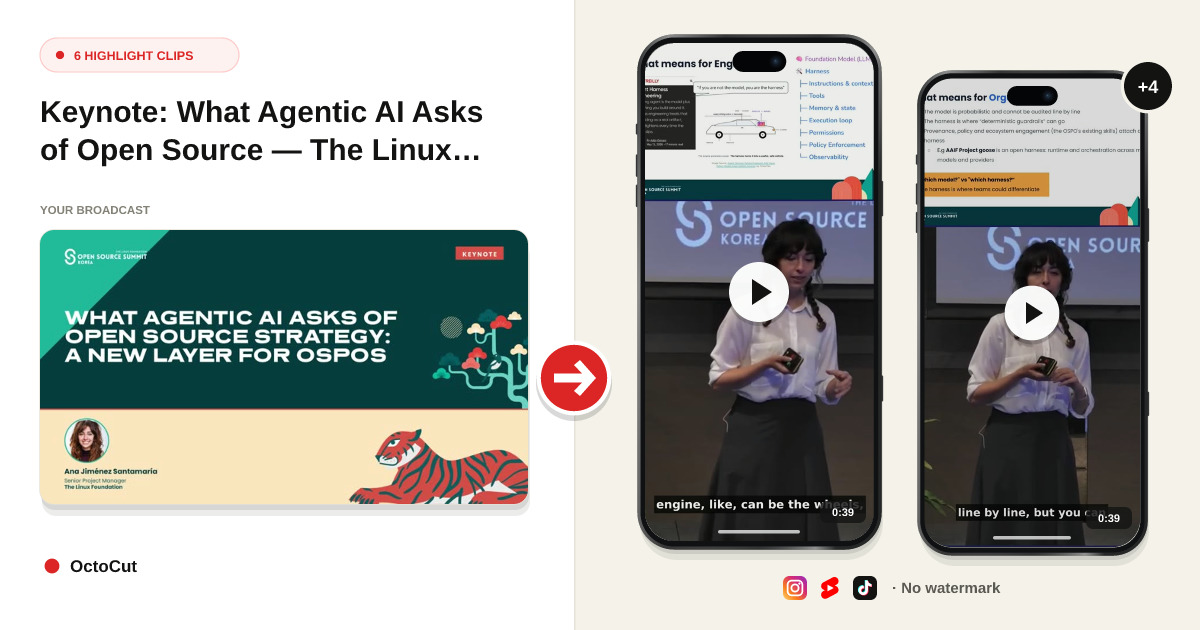
The Linux Foundation — Agentic AI Keynote Share Page
Real Unedited Output 6 ranked clips · 9:16 Slide + Speaker + CC

The Linux Foundation — Agentic AI Keynote Share Page

Unedited output from OctoCut’s Keynote/Interview Transcript AI: extracts complete spoken arguments with clean start/end sentence cuts, stacks the full 16:9 slide deck cleanly with the speaker, and burns in word-synced captions.

Open live share page ↗ Public sample footage: The Linux Foundation (CC BY)

OctoCut Live Clipping Recipe — Conferences, Summits & Keynotes

How AI Auto-Clipping Works →
Recommended AI PresetInterview / Keynote (Transcript-First + Complete Thought Cuts)
9:16 Reframing ModeSlide + Speaker PIP 9:16 (keeps widescreen slides 100% legible)
Export Aspect Ratios9:16 (LinkedIn Video, Shorts, Reels) + 4:5 (LinkedIn Feed)
Ideal Clip Duration30 – 75 seconds (one complete thesis or framework per clip)
Captions & BrandingWord-synced burned-in captions (above 440 px bottom safe zone) + Conference PNG logo
Turnaround TimePopulates live during session · Complete ranked Share Page ready at session wrap

Key Moments Captured Live

Moment TypeDetection / Clipping MethodBest Social Channels
Bold keynote theses & product announcementsTranscript-First Keynote AI + live text highlightingLinkedIn, X & YouTube Shorts
Data-heavy slide revealsSlide + Speaker PIP 9:16 layout keeps charts readableLinkedIn (9:16 or 4:5)
Fireside chat Q&A soundbitesAsk AI topic search ("find where they discuss pricing/AI")LinkedIn & Instagram Reels

Turn every keynote speaker into a same-day distribution channel

Speakers love posting sharp, captioned clips of themselves on stage — but only while the conference is still happening. Handing them an unlisted OctoCut Share Page 10 minutes after their talk multiplies organic event reach.

Run a single weekend conference on the $300 Single Event Pass

No recurring SaaS subscription to cancel afterward — 30 full days covers pre-event AV rehearsals, multi-day live clipping, and post-event downloads, backed by our 15-minute RTMP tech check.

FAQs

Conferences, Summits & Keynotes Clipping FAQs

AI presets, turnaround time, and free sample pack questions

How does OctoCut handle presentation slides when reframing a keynote to 9:16?

Instead of cropping out the slides like generic talking-head clippers, OctoCut’s Slide + Speaker PIP layout keeps the full 16:9 presentation slide legible in the upper frame while showing the speaker and burned-in captions cleanly below.

Do keynote speakers need an OctoCut account to download their clips?

No. Share Pages are unlisted URLs where speakers, sponsors, or PR managers can preview Top Picks and download clean, watermark-free MP4s with zero login.