
Clip live streams in real time.
OctoCut is a browser-based real-time live stream clipping platform (RTMP/HLS) for sports teams, conferences, and media teams — clip live via visual timeline & Quick 30s hotkeys, Video-First Sports AI, or live transcripts, and download captioned 9:16 MP4s while still on air.
Free ($0, no watermark) · Broadcast at $250/mo or $300 for a 30-day Single Event pass — no annual lock-in.
Studio Capabilities
Built for speed while the moment is still live
Everything your team needs to capture, reframe, caption, and export broadcast clips in one browser studio.
Visual Timeline & Quick 30s Hotkeys
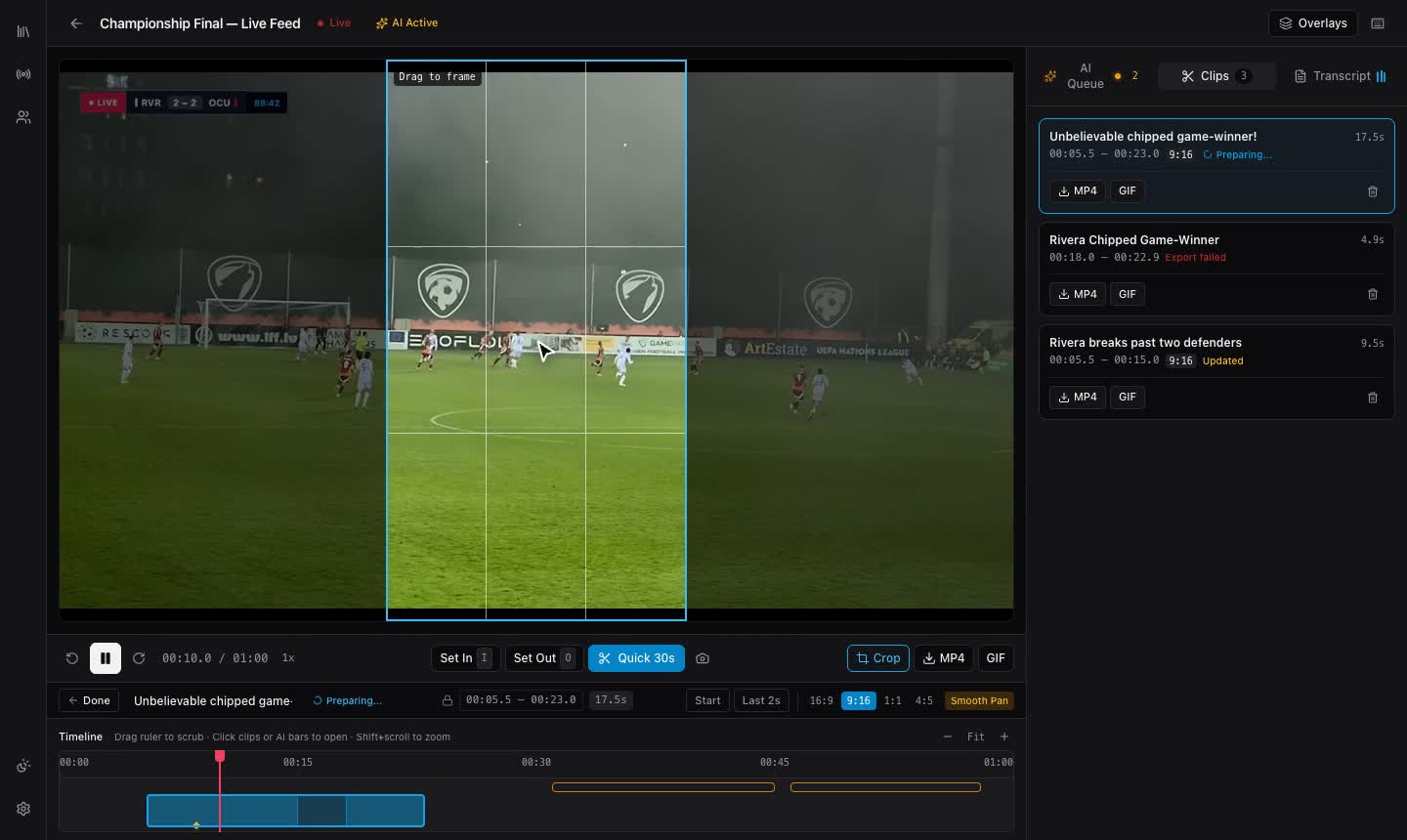
Built for live action even when nobody is talking. Scrub the full live DVR timeline, hit Set In (I) / Set Out (O), or click Quick 30s to grab the last 30 seconds instantly.
Live Transcript Clipping
Real-time word-level speech transcription turns any press conference quote, keynote line, or play-by-play call into a tight clip just by highlighting the text.
Video-First & Transcript-First AI
Live Sports and Combat Sports presets analyze video frames directly for goals, saves, knockouts, and crowd reactions — while Interview and Podcast presets score spoken soundbites.
9:16 Vertical Crop & Smooth Pan
Reframe widescreen broadcasts into 9:16, 1:1, or 4:5 right on the video stage with rule-of-thirds guides and smooth pan keyframes that follow the action.
Watermarks & Burned-in Captions
Apply reusable PNG channel logo watermarks and word-synced burned-in captions (CC) automatically on export — zero desktop NLE required.
In-Broadcast MP4 & GIF Exports
Clips render in the cloud from live HLS segments the second you save or accept them — downloadable in seconds while the stream is still live.
Built for live sports, conferences & newsrooms
One cloud studio for your whole team
No heavy desktop editors, no waiting for the broadcast to wrap, and no hunting through hours of footage after the event.
Live sports broadcasts
Spot goals, big plays, and crowd reactions with the Sports AI preset, reframe to 9:16 for Reels and Shorts, and publish while fans are still reacting. Learn more
Conferences, keynotes & webinars
Highlight quotable soundbites directly from the live transcript, burn in captions automatically, and turn sessions into shareable clips before the panel ends. Learn more
Interviews, podcasts & breaking news
Search live speech for specific topics with Ask AI, lock clean word-accurate cuts, and export branded MP4s from anywhere in the cloud.
Built for real in-broadcast clipping — verified specs
Concrete technical details on how OctoCut ingests live feeds, handles visual vs. spoken moments, and delivers finished clips while your broadcast is still on air.
| Specification | OctoCut Implementation |
|---|---|
| In-broadcast clip turnaround | Renders while the stream is still live — not post-stream VOD processing. Cuts directly from parallel-prefetched live HLS segments in a single FFmpeg pass, triggered automatically in the background the second you mark a clip or accept an AI suggestion (typically ready in 5–15 seconds depending on clip length and overlays). |
| Live DVR buffer & pre-roll | Full broadcast cloud DVR (up to 6 hours per single recording on Broadcast plans) so editors can scrub back to any minute live. One-click Quick 30s instantly captures the trailing 30 seconds before your click, and Set In (I) / Set Out (O) locks exact in/out points. |
| Manual vs. AI clipping modes | Human-triggered: Visual timeline scrubbing, I/O hotkeys, Quick 30s instant replay, and live transcript text highlighting. AI-automated: Video-First presets (Live Sports, Combat Sports) analyze video frames directly for action even with no commentary; Transcript-First presets (Interview/Speech, Podcast/Panel) + Ask AI score spoken quotes. Editors review via J/K/A/X hotkeys. |
| Ingest protocols & fidelity | RTMPS / RTMP (OBS Studio, StreamYard, vMix, Restream, hardware encoders), HLS playlist URLs, and MP4/MOV uploads (up to 5 GB / 6 hrs on Broadcast). Exports preserve source resolution & framerate (up to 1080p60) in web-ready faststart H.264 MP4 (libx264) + AAC 128 kbps audio, or GIF, with 9:16, 1:1, 4:5, and 16:9 reframing, pan keyframes, PNG watermarks, and burned-in captions. |
| Publishing vs. MP4 download | Instant MP4 & GIF download is the primary delivery workflow — download clean, watermark-free files immediately and upload directly to X, Instagram Reels, TikTok, YouTube Shorts, LinkedIn, or your existing social scheduler (Sprout, Hootsuite, Buffer) with zero OAuth token issues or API rate limits. |
| Team & pricing transparency | Browser-based shared workspaces (up to 5 seats included on Broadcast). Free ($0) forever sandbox with no watermark or card; Broadcast ($250/mo) or $300 one-time 30-day Single Event pass; Enterprise (Custom) for multi-stream venues. See full pricing. |
Get product updates
Get the latest OctoCut product updates and releases. No spam — unsubscribe at any time.
FAQs
Frequently Asked Questions
Common questions about OctoCut and real-time live clipping
Does OctoCut create finished clips while the stream is still live, or only after it ends?
OctoCut renders finished, downloadable MP4 and GIF clips while the broadcast is still live. It cuts directly from live windowed HLS segments in a single FFmpeg pass the moment you mark a clip or accept an AI suggestion — never waiting for the stream to end.
Does OctoCut work for silent sports plays or streams without commentary, or only spoken-word?
It works on both. For sports, combat sports, gaming, and commentary-free feeds, editors clip visually on the live DVR timeline with Set In (I) / Set Out (O) and one-click Quick 30s instant replay, or turn on Video-First AI presets (Live Sports and Combat Sports) that analyze video action directly. For interviews and conferences, live transcript highlighting and Transcript-First AI work side by side.
How far back can I scrub in a live stream, and does it capture pre-roll before I click?
OctoCut keeps a full cloud DVR timeline across your entire live broadcast (up to 6 hours per single recording on Broadcast plans). Clicking Quick 30s immediately captures the 30 seconds prior to your click, and you can scrub back to any earlier minute of the broadcast live.
How do I connect my live stream or video?
Push any RTMPS/RTMP feed from OBS Studio, StreamYard, vMix, Restream, or hardware broadcast encoders directly to OctoCut, connect an HLS stream URL, or upload existing MP4/MOV recordings. Free accounts can also launch an interactive simulated live stream in one click.
Does OctoCut publish directly to social platforms or export MP4 files?
OctoCut focuses on instant, background-rendered MP4 & GIF downloads (with 9:16, 1:1, 4:5, or 16:9 crop, custom PNG watermarks, and burned-in captions) so teams can post natively to X, Reels, TikTok, Shorts, LinkedIn, or any social scheduler without OAuth lock-in or API throttling.